Pan Innovation House Pan Innovation House
INDUSTRY SOFTWARE · MOULD MAKING AND TOOLROOMS

Toolroom software that keeps the numbers on every mould, from quoted hours to the shot counter after delivery

Pan Enterprise Solutions, the software arm of Pan Innovation House · based in Gaziantep, Türkiye, with a London office

For toolrooms building injection moulds, press tools or die-casting dies, we bring quotes, the part tree, the CNC and EDM calendar, trial rounds, revisions and after-sales service into one chain of records. Your CAD/CAM and accounting software stay in place; the toolroom's project and shop-floor data is added beside them as a layer. Scope is set after a discovery visit.

Asking about price? We listen to the scope in a short call and share the budget frame and timeline in writing. The first 30-minute call is free; the scope of an on-site discovery, and its fee if any, is agreed in writing during that call.

We work on site for plants in and around Gaziantep; elsewhere in Türkiye and abroad, discovery starts by video call and a visit is planned if needed. Our London office is at Unit 6 Cranford Way, Hornsey, London N8 9DG.

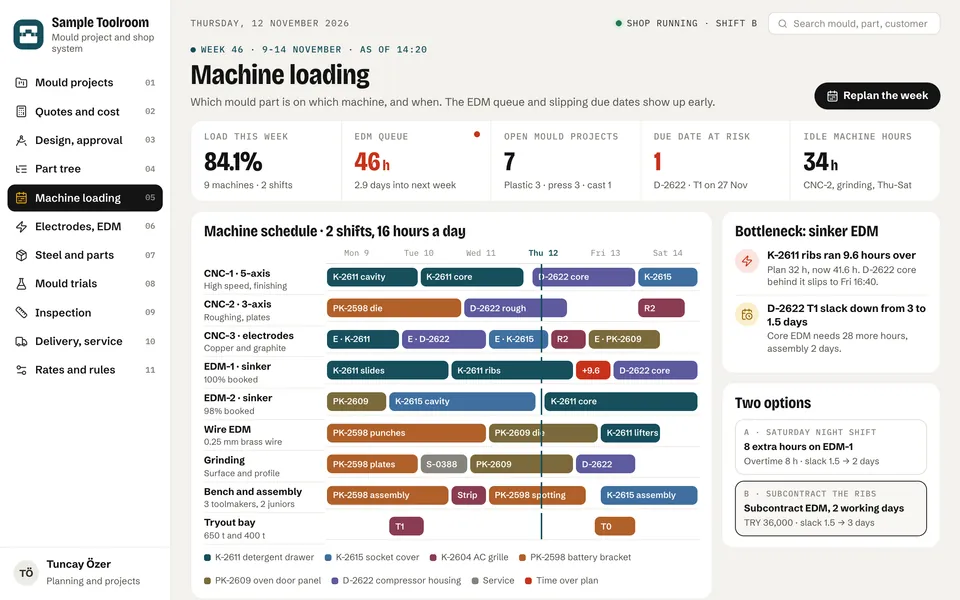
Mould-making software machine loading screen: weekly calendar of nine machines, jobs coloured by mould project, EDM bottleneck, due-date risk and two options
Hour-based quotes Design, CNC, EDM, grinding, bench and trial hours times machine rates; actual hours on similar moulds sit next to the quote.
Machine calendar Which mould part runs on which machine, and when; you see early which due date an EDM overrun pushes back.
Trials and revisions Measurements, action lists and cost for T0, T1 and later rounds are on record; the customer's change is split out as an extra quote.
Demo on request We walk through the screens with sample data in a meeting; scope is settled during discovery.

This page is a branch of Machinery Manufacturing and Metalworking software; the wider picture and the other branches are there.

Does this sound familiar?

In a toolroom, margin is lost not in the hourly rate but in hours left out of quotes, in trial rounds and in changes nobody charged for.

The sector's umbrella association points to target-price pressure, longer payment terms, a shortage of skilled toolmakers and the need to get it right first time; trade magazines note that many mould makers have only a rough idea of what a mould really costs. If one of the points below sounds familiar, this page is for you.

  • Quotes come out of a spreadsheet and the head toolmaker's estimate; two people write two different hour counts for the same kind of mould. Wire EDM, spotting and trial hours run over on every job, but the overrun never reaches the next quote.
  • When the order arrives, the mould's part tree is not known yet: cavity, core, slides, lifters and electrodes emerge as design progresses. A general ERP wants a detailed bill of materials up front, so the mould lives in spreadsheets instead.
  • Machine status is learned from the shop board or by phone. A CNC stands idle while a queue builds at sinker EDM, and which due date a few hours of EDM overrun pushes back only becomes clear on assembly day.
  • Which electrode has been milled, measured or used sits in a notebook; when an electrode cannot be found or is clamped without being measured, a day of EDM time is lost.
  • Delivery dates for steel, standard parts (mould bases, guide pillars, ejector pins, hot runners) and subcontract heat treatment are not tied to the mould's assembly date; a late hot runner quietly moves the T0 trial.
  • T0, T1 and T2 measurements, process settings and action lists are scattered across email, photos and paper. Which fix removed steel, which needed weld and recut, and how many rounds were run never builds up on the mould card.
  • The customer's engineering change and the toolroom's own correction end up on the same list; because the extra quote and schedule impact are not separated, the cost often stays with the toolroom.
  • The shot count of a delivered mould at the customer's plant, its warranty limit and the due point for stress tempering a die-casting die or regrinding a press tool are unknown at the toolroom; service starts only when something breaks.
  • Payment is tied to stages such as order, first samples and sample approval, yet those dates are not visible next to the machine plan; cash flow is forecast apart from how the mould is really progressing.
The software landscape today

Which software do toolrooms use today, and where does it fall short?

Design and machining run on strong software; the gap is in the project, machine, trial and service records between those programs and accounting. The product names below were checked on each maker's own site; features are limited to what those pages show.

LayerSoftware in use todayThe gap it leaves
Mould and press tool design (CAD) Siemens NX, Cimatron The NX pages describe the design of moulds, progressive and stamping dies, including die faces, formability, springback compensation and process models per press station. Cimatron (part of the Sandvik group) offers mould, die and electrode design and NC programming in one family. Linking the part list from design to machine hours, purchasing and a comparison with the quote lies outside these programs.
CAM, electrodes and toolroom MES hyperMILL (OPEN MIND), Tebis hyperMILL's mould and die page covers the electrode process (design, milling, measurement, EDM output), 5-axis milling and 2- to 4-axis wire EDM programming. Tebis presents itself as CAD/CAM and MES software, with ProLeiS for planning, control and evaluation. How these work alongside your local accounting and e-invoicing is a discovery question.
Sheet metal forming simulation AutoForm The maker's site lists feasibility, strip layouts, material utilisation, tool and part cost estimation, springback compensation and tryout loop reduction. If the forecast, the real result on the tryout press and the hours spent are not on the same mould card, the lesson never reaches the next quote.
Standard parts catalogue and design add-ins Meusburger (standard parts, NX-Tool and CAD tool) The maker offers mould bases, die sets, ejector pins, hot runners and other standard parts, plus NX and CAD add-ins for designers. Ordering the chosen standard parts and tying their delivery dates to the mould's assembly date stays in the toolroom's own records.
General ERP and accounting (horizontal backbone) Logo (Tiger, Netsis), Mikro, Uyumsoft These should stay for accounts, stock, invoicing and e-documents. In Uyumsoft's machinery and metal e-book a mould appears as a production asset under mould tracking and maintenance; this research found no Turkish product page that treats a mould as a one-off, project-based product with many work orders, so toolroom detail usually moves to spreadsheets.
Spreadsheets, shop board and trial folder Spreadsheet quote template, machine board, electrode notebook, trial report folder Found in every toolroom and carrying most of the work. The weakness: quote formulas depend on one person, the machine board is visible only on the shop floor, trial reports never reach the mould card, and delivered moulds' shot counts are not kept.

Product names are compiled from vendors' public pages (September 2026); PAN is not affiliated with them. The "gap" column summarises situations we commonly meet in discovery and is not a statement about any specific product.

Our approach

Toolroom software that closes the gap between design software and accounting.

We do not bring new CAD/CAM or a second accounting system. We build the project and shop-floor record from quote to after-sales service and connect it to the programs you already use. The data and source code are yours, and you choose the server.

Mould card and part tree

Every mould opens as a project: customer, part, cavities or stations, machine and press tonnage, specification, due date and payment stages. The part tree fills in as design progresses; cavity, core, slides, lifters, ejector set, hot runner, electrodes and standard parts sit under the mould with steel grade, routing and planned hours. For injection moulds, a starting template such as the mould specification sheet in ISO 16916 can be used.

Machine calendar and EDM queue

CNC, electrode milling, sinker and wire EDM, grinding, bench work and the tryout bay on one calendar, every job tied to a mould part and work order. As actual hours come in, overruns turn red and the system works out which mould's due date slips and by how much. Overtime, an extra shift or subcontracting is decided on numbers.

Trial, inspection and revision records

Dates, machine, process settings, measurements and actions for T0, T1 and later rounds sit on the mould card. Each fix is tracked by type (steel removal, weld and recut, process) and owner. The customer's engineering change opens as its own revision, with its extra quote and schedule impact kept apart from the toolroom's rounds.

An interface that talks to your ERP and design software

Transfer of accounts, stock, purchasing, delivery notes and invoices with Logo, Mikro, Netsis or whatever you use. On the CAD/CAM side, part lists and NC outputs are read where that program can export them; the program itself is not touched. Which data arrives automatically and which is entered by hand is settled during discovery.

Records shared with customers and subcontractors

Customers see mould progress, trial dates, inspection reports and change approvals; parts out to and back from heat treatment, coating and subcontract EDM are tracked. After delivery, customers report shot counts and open service requests; you decide what is shared with whom.

Quote, actual cost and service dashboards

Quoted and actual hours for every mould, by machine and type of work; items that keep running over, such as wire EDM, spotting and trials, come back as suggestions for the next quote. Shot counts, warranty status and service thresholds of moulds in the field on one list, with service revenue tracked separately.

Modules we can build

Modules we can build for a toolroom

You do not need them all at once. Most toolrooms start with hour-based quoting or the machine calendar and grow into the part tree, trial and service modules; on request we walk through most of them in a demo.

QUOTE

Hour-based quoting and cost

Design, CNC, electrode, EDM, grinding, bench, spotting, trial and inspection hours; machine rates, steel weight and price, standard parts, subcontract work, overhead and risk allowance. Actual hours on similar moulds, payment stages and quote revisions.

PROJECT

Mould card and project stages

Customer, part, mould type (injection, progressive, transfer, die-casting), cavities or stations, machine and press tonnage, specification, due date, payment stages and the real date of every stage.

TREE

Part tree and work orders

Cavity, core, slides, lifters, punches, dies, plates, ejector set, hot runner and electrodes; steel grade and block size, routing, planned and actual hours, a tree that starts with placeholders and fills in with design.

MACHINES

Machine loading and capacity

Weekly calendar by machine and team, shifts and overtime, actual hour entry, overrun alerts, bottleneck view, due-date slip calculation, comparison with a subcontract option.

EDM

Electrodes and EDM

Electrode list (copper, graphite), roughing and finishing electrodes, milling, measurement and usage status, EDM programme and time, link between electrode and mould part, the EDM queue.

SUPPLY

Steel, standard parts and subcontract

Steel orders and certificates, standard parts list and delivery dates, heat treatment and coating subcontract, hardness reports, parts out and back; all with alerts tied to the mould's assembly date.

TRIALS

Trials, inspection and revisions

T0, T1, T2 rounds, machine and process settings, measurement table and tolerances, action list and fix type, design revisions, customer changes, extra quotes, sample approval.

SERVICE

Handover, warranty and service

Handover record, spare parts list, shot counts from the customer or the mould counter, warranty limit, stress tempering, regrinding and maintenance thresholds, service requests, service history and service revenue.

DASHBOARD

Management dashboards

Open projects and due-date risk, machine load, quoted versus actual hours, number and cost of trial rounds, revenue from customer changes, expected cash by payment stage.

What it looks like on screen

What mould-making software looks like on screen

These screens come from the demo design we prepared for toolrooms building injection moulds, press tools and die-casting dies. The figures are sample data; the system is set up around your own machines, hourly rates, trial routine and existing ERP.

Machine loading. CNC, electrode milling, sinker and wire EDM, grinding, assembly and the tryout bay on one calendar, coloured by mould number. A 9.6-hour EDM overrun shows up together with how far it pushes which mould’s due date, and overtime versus subcontracting is decided on numbers.
Part tree. A mould is dozens of work orders, not one item: cavity, core, slides, lifters, ejector set, hot runner and electrodes. Each part’s steel, routing and planned versus actual hours sit on one line; the overrunning part and the supply that may be late are visible early.
Quote and cost. A progressive die quote is built from machine hours times rate, steel, standard parts, subcontract work, overhead and a risk allowance. Actual hours on three similar dies sit beside each line; before the quote goes out you see that margin falls from 13.2% to 7% if the recurring wire EDM and spotting overruns are left out.
Trials and revisions. Every round from the in-house T0 to sample approval is on record: measurement table, process settings and actions. Steel removal and weld-and-recut are tracked separately; the customer’s engineering change is split out with its extra quote and schedule impact, so it never mixes with the toolroom’s own rounds.
Delivery and service. Every delivered mould’s count, warranty limit and service threshold on one list: stress tempering intervals on die-casting dies, regrinding on press tools, maintenance on plastic moulds. A service quote goes out before a failure when a mould passes its threshold, and the history builds up on the mould card.

Company names, people and figures on these screens are sample data. The system is built around your own processes, document names and rules. We walk you through the demo in a call: request a demo

Integration with your existing ERP

Your design software and your accounting system both stay in place.

Most toolrooms already have two solid sides: CAD/CAM for designs and NC programmes, and an accounting and e-invoicing system. What is missing is the project, machine, trial and service record between them. That is the layer we build.

Our integration approach →
  • Transfer of accounts, stock, purchasing, delivery notes and invoices with Logo, Mikro, Netsis or your own system; double entry ends and accounting stays where it is.
  • If your CAD/CAM software can export part lists or NC outputs, they are read into the part tree and machine time; the design software is not touched. Data that cannot be exported is entered by hand or from a file.
  • Quote templates, machine rates and past mould hours kept in spreadsheets are imported; the formulas move out of one person's head and into the software.
  • Customers and subcontractors see only the moulds and records that concern them; customers report shot counts and can open service requests. You decide what is shared.
  • The data and source code are yours; you choose an on-site or cloud server.
Outcomes

What changes in the toolroom once this layer is in place?

  • Quotes are written against actual hours on similar moulds, not one person's estimate; an item that keeps running over shows before the quote goes out, with the margin it would cost.
  • Each mould's part tree, steel and routing are in one place; planned and actual hours are compared part by part, so an overrunning part is noticed before assembly.
  • The machine calendar moves from the shop board to the screen; you see the same day which due date an EDM overrun pushes back and choose between overtime and subcontracting on numbers.
  • A standard part or subcontract return that will arrive late raises an alert early, measured against the mould's assembly date.
  • Trial measurements and action lists build up on the mould card; you know how many rounds were run and what each one cost.
  • The customer's change is recorded as its own revision and extra quote; its cost and schedule impact no longer stay with the toolroom.
  • Shot counts and service thresholds of delivered moulds are tracked; service is offered before a failure, and each mould's history informs the next design.
  • Payment stages are tied to the mould's real progress; a slip in the first-sample or approval date shows in the cash forecast the same day.
Process

A realistic five-stage path that begins with discovery.

  1. 01

    First meeting and demo

    1 week

    We listen to the mould types you build (injection, progressive, transfer, die-casting), your machine park, CAD/CAM software, quoting method and accounting system. We walk through the screens together and talk about which of them matches your toolroom.

  2. 02

    Discovery and scope

    1-2 weeks

    We visit the shop floor, EDM section, bench area and tryout bay; we review quote templates, hours from past moulds and trial reports, and find where the most is lost. The first phase's scope and timeline are put in writing.

  3. 03

    First phase build

    depends on scope

    We usually start with hour-based quoting and the machine calendar, or with the part tree; the ERP transfer and first dashboards are set up. Machine rates, routing templates and quote lines come from your own method.

  4. 04

    Shop-floor pilot

    a few weeks

    Live use on one or two mould projects with planning, machine operators, toolmakers and whoever writes quotes. Entered hours are compared with reality and screens and rules are adjusted to your shop.

  5. 05

    Expansion and handover

    ongoing

    Electrode, trial and revision, supply and after-sales service modules are added in turn. The data and source code are yours; training and documentation let your team run it, with support under a support agreement.

Why Pan Innovation House?

A team that speaks the toolroom's language and builds the record on the shop floor.

You see the screens first

A demonstration, not a promise: on request we walk through the machine, part tree, quote, trial and service screens together in a meeting. Your system is then built from this core around your own toolroom.

We work in toolroom terms

Cavity, core, slide, lifter, punch, die, electrode, spotting, T0, T1, steel removal and revision appear on screen under the names you already use; nobody on the bench learns a new vocabulary.

We leave your design and accounting software alone

Your CAD/CAM software and Logo, Mikro, Netsis or any other accounting system stay in place. We fill the project, machine, trial and service gap between them.

Your data, your code

The source code and data belong to you, and you choose the server. If you ever decide to leave us, your system stays in your hands.

We start with discovery

First we see your shop floor, your machines and the way you quote; scope and timeline are written after that. Capacity and price follow from the work you actually need.

Based in Gaziantep, with an office in London

The team is in Gaziantep, with an office in London. We can come on site or support you remotely, including the English reporting needs of a toolroom building moulds for customers abroad.

Frequently asked questions

Mould Making and Toolrooms software: common questions

Does mould-making software replace our existing ERP?

No. Logo, Mikro, Netsis or whatever you use stays in place for accounts, stock, invoicing and e-documents. Toolroom software builds the project record for quotes, the part tree, machines, trials and service, and talks to your ERP. How the transfer works is settled during discovery, depending on your system's version.

Does it replace our CAD/CAM software?

No. Programs such as Siemens NX, Cimatron, hyperMILL and Tebis are design and NC programming tools; their makers' pages describe mould, die and electrode design and machining strategies. Toolroom software keeps the project, machine, cost and service record of what those programs design.

How is an hour-based quote calculated?

For each type of work (design, CNC, electrodes, sinker and wire EDM, grinding, bench, spotting, trials, inspection), estimated hours are multiplied by your machine rate; steel weight and price, standard parts, subcontract heat treatment and coating, overhead and a risk allowance are added. The software puts actual hours from similar moulds next to the quote and flags items that keep running over; you set the rates, allowances and margin.

How do you plan when the part tree is unknown at order time?

The mould opens with placeholders based on the work types and hours in the quote; as design progresses, parts such as cavity, core, slides, lifters and electrodes are added and replace the placeholder hours. A trade magazine describes a toolmaker choosing this kind of planning over a general ERP that demanded detailed data at project start.

How do we see the EDM bottleneck?

The sinker and wire EDM calendar sits on the same screen as every other machine; as actual hours are entered, overruns show and the system works out how far the jobs behind them push back which mould's due date. Trade publications often name EDM as the bottleneck in shortening mould lead times. The milling, measurement and usage status of electrodes is tracked in the same record.

How are T0, T1 and T2 trials kept in the software?

Each round is a separate record on the mould card: date, machine or press, process settings, measurement table, issues and actions. Every fix is tracked by type (steel removal, weld and recut, process), owner and date. Round names and approval criteria follow your routine and your customer's; T0 as the in-house trial and T1 as first customer samples is common, but contracts differ.

How do you separate a customer change from the toolroom's own fix?

The customer's engineering change opens as its own revision, with affected parts, extra hours, extra quote, schedule impact and approval status. The toolroom's own trial fixes stay on the trial round's action list, so the record shows which hours were charged to whom.

Can plastic moulds, press tools and die-casting dies share one system?

Yes. The mould type is chosen on the mould card and the part tree template follows: cavity, core, slides, ejectors and hot runner for an injection mould; punches, dies, plates, strip and stations for a progressive die; die blocks, cores and cooling for a die-casting die. The machine calendar, quoting and service are shared by all three.

How do we track the shot count of a mould we have delivered?

The count comes from the customer's report, a service visit or the mould counter; source and date are recorded. Each mould gets a warranty limit and a service threshold: maintenance for plastic moulds, regrinding for press tools, stress tempering for die-casting dies. One steel maker's die-casting brochure recommends stress tempering aluminium dies after running-in, at set shot counts, then every 10,000 to 20,000 shots; you set the threshold.

Which customs headings apply when exporting moulds?

Under the international Harmonized System descriptions, injection or compression moulds for rubber or plastics fall under 8480.71, injection or compression moulds for metal or metal carbides under 8480.41, mould bases under 8480.20, while tools for pressing, stamping or punching are classed under 8207.30. The exact heading for your mould type is settled with your customs broker; the software can keep that information and the export documents on the mould card.

What does Türkiye's mould trade look like?

According to UN Comtrade, Türkiye's exports under heading 8480 were 298.6 million dollars in 2024 and imports 344.4 million; for injection and compression moulds for plastics (8480.71), imports were 224.7 million and exports 92.8 million dollars. The National Mould Manufacturers Association's brochure also states that only 30 percent of the mould needs of the automotive and white goods industries is met by domestic supply (2018 data).

How long does setup take, and how is the cost set?

The first meeting and demo take a week and discovery one to two weeks; the duration and cost of the first phase are given in writing based on the scope found in discovery. We price according to the work required rather than as a fixed package.

Next step

Let's walk through the screens together, then visit your toolroom

A toolroom's system cannot be written from a distance. First let's walk through the screens together; then we visit your shop floor, EDM section and tryout bay and put the first phase in writing.

Related services

Related areas worth considering

Pan Innovation House

Call us

By phone

+90 543 930 12 72

Our phone line is open every day.

WhatsApp on your phone

Scan with your phone camera. The chat opens with your message ready.

Prefer that we call you? Leave your details