Pan Innovation House Pan Innovation House
INDUSTRY SOFTWARE · PRINTING HOUSES

Printing house software that keeps the numbers on every job, from the sheet in the quote to the carton at dispatch

Pan Enterprise Solutions, the software arm of Pan Innovation House · based in Gaziantep, Türkiye, with a London office

We bring the quote, sheet layout, waste allowance, job ticket, CTP plates, press schedule, paper and ink stock, colour measurement, finishing and outwork, statutory copies and dispatch into one chain of records. Whether you print offset, digital, labels or folding cartons, Logo, Mikro or the accounting software you already use stays in place, and the print shop layer is added alongside it. Scope is set during discovery.

Asking about price? We listen to the scope in a short call and share the budget frame and timeline in writing. The first 30-minute call is free; the scope of an on-site discovery, and its fee if any, is agreed in writing during that call.

We work on site for plants in and around Gaziantep; elsewhere in Türkiye and abroad, discovery starts by video call and a visit is planned if needed. Our London office is at Unit 6 Cranford Way, Hornsey, London N8 9DG.

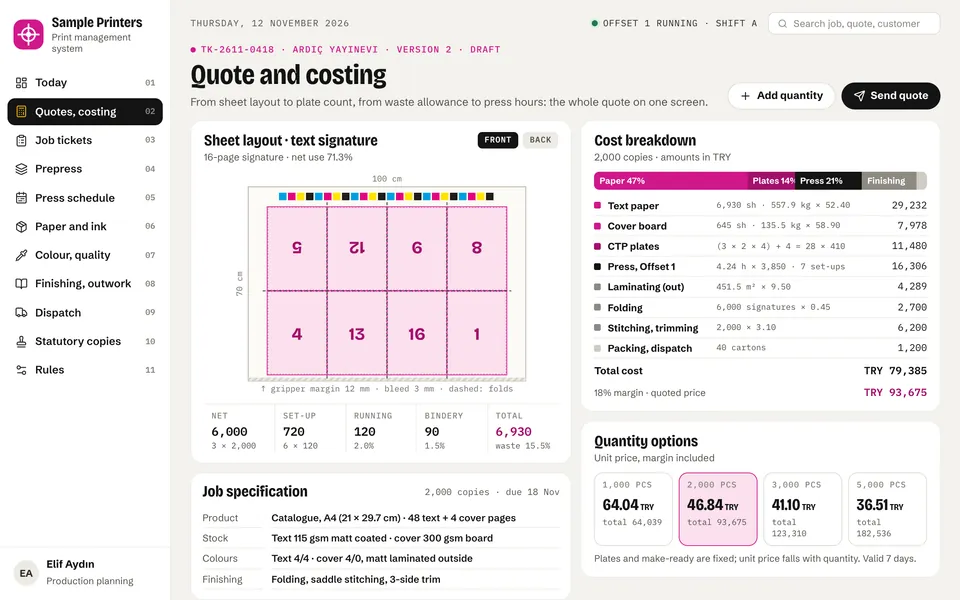
Printing house software quote screen: 16-page signature on a 70 × 100 sheet, waste allowance, cost breakdown for paper, plates, press and finishing, quantity options
Quotes from the sheet How many pages or pieces fit the sheet, how many plates are needed, make-ready and bindery waste, press hours and outwork costs in one calculation; change the quantity and the unit price follows.
Measured colour Proof, client signature and OK sheet go on record; pulled sheets are measured against the same aim during the run, so a complaint is answered with measurements.
Statutory copies on the calendar For books and periodicals, imprint checks and copy deliveries, and for authorised tax forms the filing deadline, are reminded as steps of the job ticket.
Demo on request We walk through the quote, press schedule, paper and waste, colour approval and job ticket screens with sample data in one meeting; scope is settled at discovery.
Does this sound familiar?

In a print shop, margin is not lost on the paper price but on sheets and hours that slip away between quote and dispatch.

Every print job is a small project rebuilt from scratch: size, pages, stock, colours, finishing and deadline all change. If even one line below looks familiar, this page was written for you.

  • Quotes are built in one or two people's spreadsheets; sheet layout, waste allowance, plate count and press hours follow rules that live in their heads. When that person is away, quotes are late or the same job gets two different prices.
  • When a client asks for 1,000, 2,000 and 5,000 copies, each quantity is worked out separately; how fixed costs such as plates and make-ready spread over the run is not visible, and losses on short runs go unnoticed.
  • Paper prices change often and the price in the quote file is not updated; when an expired quote is approved, the job costs more than it was sold for.
  • The approved quote is retyped into the job ticket; stock, grammage, colours or finishing notes get lost on the way and the mistake is found after printing.
  • The press schedule lives on a whiteboard or in the shift supervisor's head: a job without plates, uncut paper or an unsigned proof is called to the press and the press waits.
  • Jobs that share a spot colour are scattered across the plan; the unit is washed every time and make-ready time and waste grow for no reason.
  • Nobody knows how much paper in stock is already reserved, or for which job; counted sheets turn out to be cut for another job, and client-supplied paper mixes with the shop's own stock.
  • The waste allowance assumed in the quote is never compared with actual waste; which press, which job type and which stage lose extra sheets is unknown even at month end.
  • In a colour dispute, all you have is the OK sheet itself; with no measurement values, no samples pulled during the run and no written colour limit agreed with the client, the discussion comes down to opinion.
  • Lamination, foiling, binding or die-cutting goes out to subcontractors; sheets and copies sent and received are logged in a notebook, and nobody can tell where shortages and spoilage ended up.
  • For books and magazines, the copies due to the prosecutor and the governor, imprint checks, or the filing deadline for authorised tax forms depend on one person's memory.
The software landscape today

Which software do printing houses use today, and where does it get stuck?

In this research we could not verify a Turkish product that openly presents print-specific quoting, signature and plate calculation on its own site. A 2009 master's thesis notes that ERP in Turkish printing was used only by a few institutionalised firms or firms on the way there. The product names below were read on their makers' own pages; features are limited to what those pages show.

LayerSoftware in use todayThe gap it leaves
General ERP and accounting (horizontal backbone) Logo Tiger 3 Enterprise, Mikro, DİA Solid for accounts, stock, invoicing and e-documents, and should stay. The makers' pages show production and stock modules, but not print concepts such as signatures, plates, sheet layout, waste allowance or finishing steps; quote and job ticket detail usually stays in spreadsheets.
Commercial print MIS (international) Pace, PrintSmith Vision, Tharstern, Monarch, Avanti All are offered under the Print ePS umbrella as management information systems for printers, covering scales from small quick print to large multi-site printers. A Turkish interface, Turkey's e-document rules and working alongside local accounting software were not read on the makers' pages; these are questions for discovery.
Label and packaging MIS CERM The maker's page targets narrow-web labels, sheetfed labels, flexible packaging, folding carton and corrugated converters; it lists sales orders, production, warehousing, shipping, invoicing, tooling and web-to-print. International; local e-document and accounting links are a discovery topic.
Press manufacturer's workflow Heidelberg Prinect (Prinect Business, Prinect Production) The maker's page describes faster quoting and job creation, production automation, colour and quality management and reporting. Subcontractors, statutory copies and links to accounting software used in Turkey are not covered on that page; these are questions for discovery.
Prepress workflow Kodak PRINERGY (Connect, Evo, PREPS), Esko Automation Engine The PRINERGY platform groups workflow, imposition and proofing products; Automation Engine describes content error checks, step and repeat and two-way data exchange with an MIS for offset, flexo, digital and gravure. Their strength is files and plates; quoting, waste, outwork and dispatch need a separate layer.
Spreadsheets, job bags and whiteboards Quote sheet, paper log, job bag, planning board Alive in every print shop and carrying most of the work. The weakness: the calculation depends on one person, quoted waste is never compared with actual, plate and paper readiness is not tied to the plan, and there are no reminders for outwork or statutory copies.

Product names are compiled from vendors' public pages (September 2026); PAN is not affiliated with them. The "gap" column summarises situations we commonly meet in discovery and is not a statement about any specific product.

Our approach

A layer that keeps the print shop's work in one record, from quote to dispatch.

We do not bring a second accounting program or a new prepress workflow into your print shop. We build the chain of records from quote to dispatch and connect it to the programs and presses you already have. The data and source code are yours, and you choose the server.

Quotes built from the sheet layout

With trim size, bleed and gripper margin, the system works out how many pages or pieces fit the sheet; signatures, plate count, make-ready waste, running and bindery waste, press hours, finishing and outwork costs come together in one calculation with your own tables. Unit prices for several quantities sit side by side and quote versions are kept.

The quote becomes the job ticket

An approved quote turns into a job ticket in one click; stock, grammage, size, colours, plate list, finishing steps and deadline are not retyped. The job ticket prints in a form the shop floor can read, and every step is tied to the job number.

A press schedule that knows plates and paper

Offset, digital, CTP, cutting and bindery on one timeline; make-ready shows apart from running time. A job without plates, cut paper or a signed proof turns red before it reaches the press, and jobs that share a spot colour are suggested back to back.

Paper reservations and waste records

Paper and board are tracked by grammage, size and grain direction; sheets are reserved when the job ticket opens, and client-supplied paper is held separately. Make-ready, running, cutting and bindery waste is recorded stage by stage and compared with the quoted allowance.

Colour approval and measurement records

Proof, client signature, OK sheet and the measurements of sheets pulled during the run are linked to the job ticket. Solids are checked against ISO 12647-2 limits and the spot colour against the limit agreed in writing with the client; exported files from your measuring device can be read.

Outwork, statutory copies and accounting link

Sheets or copies sent to and received from subcontractors are counted, and spoilage goes to the subcontractor scorecard. For books and periodicals, imprint and copy deliveries, and for authorised tax forms the filing deadline, land on the calendar. Invoices and delivery notes are passed to your accounting software.

Modules we can build

Modules we can build for a printing house

You do not need all of them at once. Most print shops start with quotes and job tickets or with the press schedule, and grow with paper, waste, colour and outwork modules. On request, we can show most of these modules in a demo.

QUOTES

Quotes and costing

Product templates (catalogue, book, brochure, carton, label), sheet layout, signature and plate calculation, waste allowance tables, press hourly rates, finishing and outwork prices, quantity options, quote versions, validity and approval.

JOB TICKET

Job tickets and job bags

Job ticket from the quote, printed job bag, step list, deadline, client notes, recalling settings from the previous run on reprints, and linking every record to the job number.

PREPRESS

Prepress and CTP

File intake, file check notes, proof versions, client sign-off, plate list, plate output log, and plate readiness flowing into the schedule.

SCHEDULE

Press and bindery schedule

Timeline by press and station, make-ready and running time, colour sequence, plate, paper and proof readiness checks, shift sheet and delay alerts.

PAPER

Paper, board and ink

Grammage, size, grain direction, sheet and reel stock, reservations by job ticket, free stock, client-owned paper, reorder points, ink and spot colour mixing records.

WASTE

Waste and yield

Stage-by-stage records of make-ready, running, cutting and bindery waste, comparison with the quoted allowance, and waste reports by press and job type.

COLOUR

Colour approval and quality

Proof and OK sheet records, reading measurement files, ΔE values, ISO 12647-2 limits, client limits for spot colours, sampling plan, complaint and return records.

OUTWORK

Finishing and outwork

Outwork notes for lamination, coating, foiling, embossing, die-cutting and binding, counts sent and received, spoilage and shortages, subcontractor scorecards and outwork cost posted to the job.

STATUTORY

Statutory copies and tax form printing

Imprint checklist, delivery records and receipts for copies to the prosecutor and the governor, marking who owes legal deposit, series and serial numbers for authorised tax forms, handover reports and filing deadlines.

What it looks like on screen

What printing house software looks like on screen

These screens come from the demo we built for printing houses. The figures are sample data; the system is set up around your own presses, papers, subcontractors and quoting rules.

Quote and costing. How many pages fit the sheet, how many plates are needed, make-ready and bindery waste, press hours and outsourced lamination in one calculation. Change the quantity and the unit price follows; the quote no longer lives in one estimator’s head.
Press schedule. Offset, digital, CTP, guillotine and bindery on one timeline. Make-ready shows apart from running time; a job without plates or a signed proof turns red before it reaches the press, and jobs sharing a spot colour are lined up back to back.
Paper and waste. Paper is tracked by grammage, size and grain direction; sheets are reserved when the job ticket opens and client-owned paper is kept apart. Quoted waste allowance and actual waste sit side by side for every job.
Colour approval. Proof, client signature and OK sheet go on record; every pulled sheet is measured against the same aim during the run. Solids are checked against ISO 12647-2 limits and the spot colour against the written client limit, so a complaint is answered with measurements.
Job ticket and outwork. An approved quote becomes the job ticket; plates, paper, press, outwork and dispatch are steps of one record. Sheets going out to subcontractors are counted out and back; statutory copies for book jobs and the filing deadline for authorised tax forms land on the calendar.

Company names, people and figures on these screens are sample data. The system is built around your own processes, document names and rules. We walk you through the demo in a call: request a demo

Integration with your existing ERP

Your accounting software, your prepress workflow and your presses all stay in place.

Most print shops already have two solid sides: accounting and e-document software on one, prepress workflow and presses on the other. What is missing is the layer that keeps the work between quote and dispatch in one chain of records. That is the layer we build.

Our integration approach →
  • Transfer of accounts, stock, sales orders, delivery notes and invoices with Logo, Mikro, DİA or your own program; double entry goes away and accounting stays where it is.
  • Reading job and plate information from your prepress workflow, or sending job information to it; the route depends on the software version and its export options.
  • Linking measurement files exported by your colour measuring device or software to the job ticket.
  • Writing press counter and status data into the actual side of the schedule where the press allows it; where it does not, shift records by tablet or barcode.
  • Sharing documents and status with subcontractors, paper suppliers and clients under the job number.
Outcomes

What changes in the print shop once this layer is in place?

  • Quoting no longer depends on one person: the same job gets the same price, and the calculation is visible line by line.
  • Quantity options sit side by side; the spread of fixed costs over the run becomes a figure you can discuss with the client.
  • The quote passes into the job ticket without retyping; errors in stock, colour and finishing notes drop.
  • Plates, paper and proof are checked before a job reaches the press; the hours a press waits for a job that is not ready become visible.
  • Shared colours are run back to back, and make-ready time and waste are handled at the planning stage.
  • Reservations and client-owned paper are tracked separately; count differences trace back to the job ticket.
  • Quoted waste allowance is compared with actual waste on every job; the waste table turns from an estimate into a measurement.
  • Colour complaints are answered with measurement records; proof, signature and OK sheet stay in one file.
  • Outwork counts and statutory copies sit on the calendar; shortages, spoilage and deadlines stop depending on someone's memory.
Process

A realistic five-stage path that begins with discovery.

  1. 01

    First meeting and demo

    1 week

    We listen to your print processes (offset, digital, labels, folding cartons), press fleet, finishing and outwork set-up, how you quote and which accounting program you use, then walk through the screens together.

  2. 02

    Discovery and scope

    1-2 weeks

    We see your quote files, job bags, planning board, paper store and bindery on site; we review existing spreadsheet and program data and talk through where most sheets and hours are lost. The limits and timeline of the first phase are put in writing.

  3. 03

    First phase build

    depends on scope

    We usually start with quotes and job tickets or with the press schedule; the accounting link and first reports are set up. Waste allowances, press hourly rates and product templates come from your own tables.

  4. 04

    Shop-floor pilot

    a few weeks

    Live use on one press group and the bindery, with the estimator, planner, press operators and paper store. Calculated waste and time are compared with actual figures, and screens and rules are adjusted to the shop floor.

  5. 05

    Expansion and handover

    ongoing

    Paper, colour, outwork and statutory modules are added in turn. The data and source code stay with you; training and documentation are provided so your team can run it, with support afterwards under a support agreement.

Why Pan Innovation House?

A team that speaks the print shop's language and builds the chain of records on the shop floor.

You see the screens first

A demo, not a promise: on request we walk through the quote, press schedule, paper and waste, colour approval and job ticket screens together in one meeting. Your system is built from this core around your own print shop.

We work in printers' terms

Signature, sheet, gripper margin, bleed, make-ready waste, work-and-turn, OK sheet, lamination, embossing, gathering and job bag appear on screen under the names your people use; nobody has to learn a new language.

We do not touch your accounting

Logo, Mikro, DİA or another program stays where it is. We fill the gap on the quote, schedule, paper, colour and outwork side.

The data and code are yours

The source code and data stay with the client, and you choose the server. If you ever want to leave us, your system stays in your hands.

We start with discovery

We first see your quote file, shop floor and paper store; scope and timeline are written after that. Capacity and price are set by the work your shop actually needs.

Based in Gaziantep, with a London office

The team is in Gaziantep, with an office in London. We can come to your shop floor or support you remotely, and handle English-language documents for printers with clients abroad.

Frequently asked questions

Printing Houses software: common questions

Does printing house software replace our current ERP?

No. Logo, Mikro, DİA or the program you use stays in place for accounts, stock, invoicing and e-documents. Printing house software builds the chain of records on the quote, job ticket, schedule, paper, waste, colour and outwork side and talks to your accounting program. How the transfer works is settled at discovery, depending on the program version.

How is quoting set up, and can we use our own waste table?

Yes. Quoting is built on your rules: sheet sizes, your waste allowance table, your press hourly rates, your finishing and outwork prices. The software works out how many pieces fit the sheet from trim size, bleed and gripper margin, plus the number of signatures and plates; the estimator sees the result and adjusts it when needed.

Can offset, digital, label and carton work live in the same system?

Yes. Each process comes with its own product template: signatures and plates for offset, click or sheet cost for digital, reel width and metres for labels, blank layout, cutting die and gluing for cartons. Job tickets, scheduling, paper and dispatch stay shared.

Which standard is used for colour approval?

For sheetfed and web offset, ISO 12647-2:2013 defines the printing conditions; the printing sequence is black, cyan, magenta, yellow, and ISO 12647-7 applies to digital proofs. The solid deviation tolerances in this edition are reported as 3.5 ΔE00 for cyan, magenta and yellow and 5 ΔE00 for black. The standard sets no tolerance for spot colours; the spot colour limit is agreed in writing with the client and recorded on the job ticket in the system.

Can data from our measuring device come into the system?

If your measurement software can export results as a file, that file can be linked to the job ticket; the route depends on the device and software version and is settled at discovery. Where export is not possible, values are entered on screen and compared with the same aim.

What are a printer's legal duties when printing books and magazines in Turkey?

Under Article 4 of Press Law No. 5187, every printed work shows where and when it was printed and the names, trade names and business addresses of the printer and, if any, the publisher; under Article 10, the printer delivers two signed copies of each publication to the Chief Public Prosecutor's Office on the day of distribution or publication and receives a receipt. Article 4 of Printing Houses Law No. 5681 also requires two copies of each printed work to be handed to the public prosecutor and the highest local administrative authority within working hours on the day printing ends; invitations, notices, forms, circulars and business cards are excluded. The system reminds these steps as part of the job ticket and keeps the delivery record; for legal interpretation, please consult your own adviser.

Does the printer send the legal deposit copies?

Under Law No. 6279 on the Legal Deposit of Reproduced Works, the depositor for books, periodicals and graphic works is the publisher; only where there is no publisher is it the printing house. Copies are delivered within fifteen days after reproduction, and binding the work elsewhere does not lift the responsibility. The system marks who owes the deposit on each job.

What is there for authorised printers of invoices and delivery notes?

Under the document printing regulation issued under the Tax Procedure Law, these forms are printed by printers with an agreement with the provincial tax directorate; orders are printed within fifteen days and handed over with a report, and an information form is prepared for each print run and sent electronically by the end of the fifteenth day after it is drawn up. The system keeps series and serial numbers, the handover report and the filing deadline together with the job ticket.

How is client-supplied paper tracked?

Client-owned paper is held as separate stock in trust; it does not mix with your own stock and is not costed. The quantity reserved for the job, sheets used and sheets returned are visible per client.

How is outwork tracked?

An outwork note for lamination, foiling, embossing, die-cutting or binding is issued from the job ticket. Sheets or copies sent and received are counted, shortages and spoilage go to the subcontractor scorecard, and the outwork cost is added to the job.

Can data be taken automatically from the presses?

It depends on what the press can provide. If counter or status data is available, it is written into the actual side of the schedule. If not, operators record job start, make-ready, running and stoppages by tablet or barcode, and the schedule is still updated with real data.

Is it suitable for a small print shop?

Yes. A single-press shop usually starts with quotes and job tickets; press scheduling, paper, colour and outwork modules are added when needed. You do not need to install everything at once.

How much does it cost and how long does it take?

It depends on the print processes, number of presses, module scope and the programs to be connected. After discovery, the scope, timeline and price of the first phase are put in writing; later phases are planned separately.

Next step

Let's walk through the screens, then visit your print shop

A print shop's system cannot be written from a distance. First, let's go through the quote, press schedule, paper and waste, colour approval and job ticket screens together; then we see your quote file, shop floor and paper store on site and put the first phase in writing.

Related services

Related areas worth considering

Pan Innovation House

Call us

By phone

+90 543 930 12 72

Our phone line is open every day.

WhatsApp on your phone

Scan with your phone camera. The chat opens with your message ready.

Prefer that we call you? Leave your details